How to add online booking to your salon website
Short answer: add Tervita online booking by pasting one script tag into your website HTML, putting your booking-page slug in data-clinic, and choosing inline, popup or bubble mode. Inline places the booking form in the page, popup opens it from a button, and bubble adds a floating booking button. The builder below generates code using only the options that embed.js actually supports.
Embedding the form shortens the path between a visitor understanding a service and choosing an available time. The visitor stays on your domain while the booking flow itself comes from Tervita, so it uses the same live services, specialists, schedules and booking settings as your public page. Keep the direct booking link too: it remains the better format for Instagram, Google Business Profile, messages and a resilient fallback.
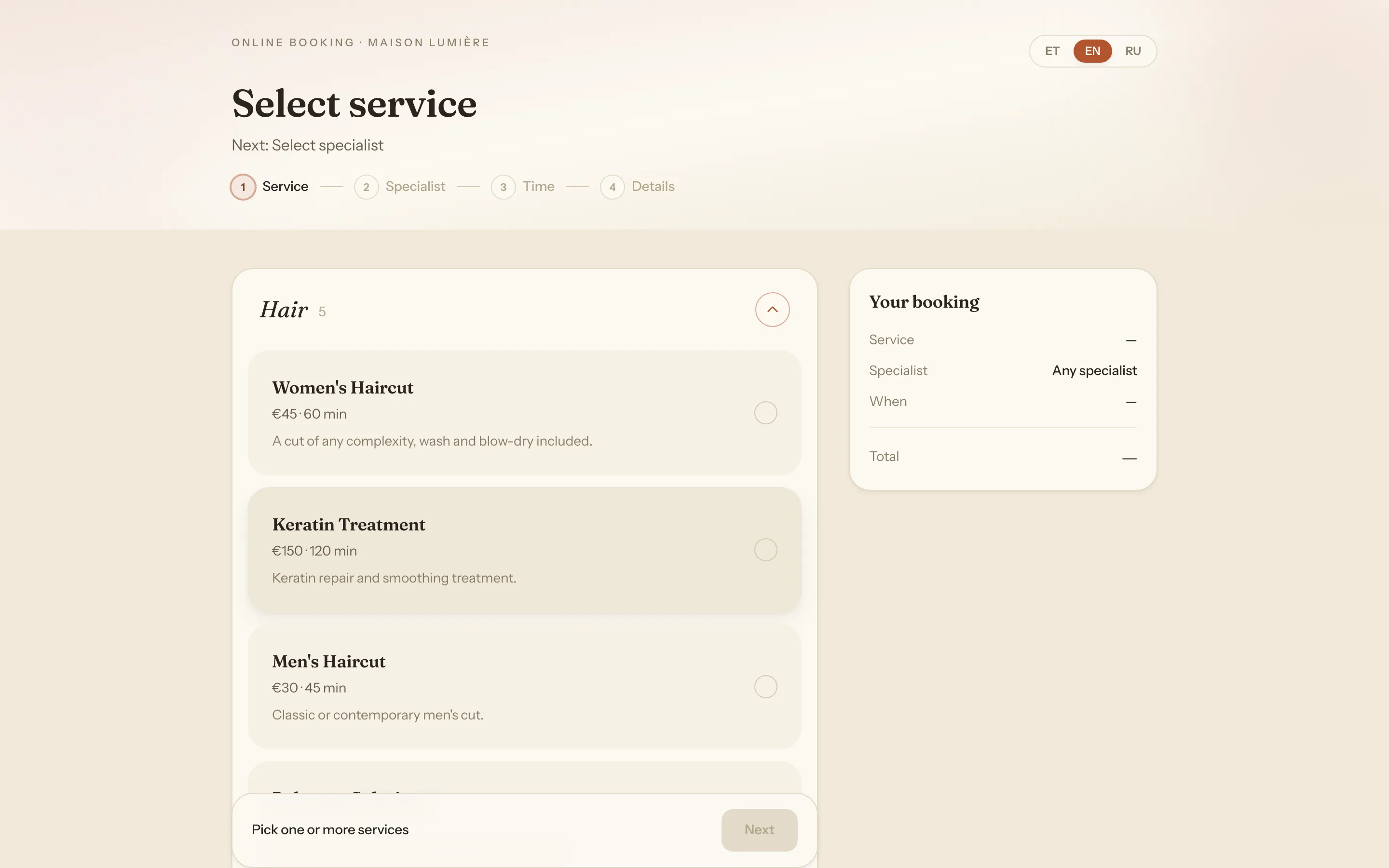
If the booking flow itself is not ready yet, begin with our practical online-booking guide. Your public booking page explains where to find the address, while Booking settings covers languages, service display, approvals, contact verification, cancellation and rescheduling.
Should you use inline, popup or bubble mode?
The three modes are different presentations of the same booking page, not separate forms or product plans.
| Mode | What the visitor sees | Good placement | What to test |
|---|---|---|---|
| Inline | The booking form sits directly in the page | A dedicated Book page or the end of a service/pricing page | Container width, changing height and mobile layout |
| Popup | A regular button opens the form in a centred modal | Hero, header, service card or pricing CTA | Keyboard focus and conflicts with other modals |
| Bubble | A floating button stays at the bottom-right and opens the same modal | Site-wide access to booking | Cookie banner, chat, mobile navigation and small screens |
Inline is usually the clearest choice on a dedicated booking page because the next action is already visible. A long form can dominate a homepage, so a popup button often fits that page better. A bubble can be a useful secondary route on every page, but it should not be the only one: a visible text link or button is easier to understand, find and use as a fallback.
The inline frame starts with a minimum height of 520 pixels and then follows height messages from the booking flow as the visitor moves between steps. Popup and bubble do not assign the form's iframe URL until the visitor clicks, so the booking page itself is deferred until there is intent.
Build the embed code
Enter the booking slug: the part of your direct Tervita URL after /booking/. If the full address is https://tervita.ee/booking/my-salon, enter my-salon. Do not paste the domain, the /booking/ segment, or surrounding slashes.
Build your Tervita booking widget
Choose a display mode and language. The builder only emits options supported by the public embed.js contract.
<script src="https://tervita.ee/embed.js" data-clinic="my-salon" data-mode="inline" data-lang="en" async></script>Changing the booking-page address in Tervita changes the live URL immediately, and the old address stops working. If you change it later, update data-clinic everywhere the widget or direct link appears.
Working examples for all three modes
Inline: put the form inside the page
<script
  src="https://tervita.ee/embed.js"
  data-clinic="my-salon"
  data-lang="en"
  async
></script>
Inline is the default, so data-mode="inline" is optional. The script inserts an iframe immediately before its own tag, gives it 100% width, removes the border, enables lazy loading and starts it at a 520-pixel minimum height. To use a larger minimum:
<script
  src="https://tervita.ee/embed.js"
  data-clinic="my-salon"
  data-lang="en"
  data-min-height="640"
  async
></script>
Use a positive whole number without px. The auto-height listener accepts a tervita:height message only from the origin that served embed.js and from that particular iframe. That origin and source check also lets more than one embed coexist without one frame resizing another.
Popup: open booking from a button
<script
  src="https://tervita.ee/embed.js"
  data-clinic="my-salon"
  data-lang="en"
  data-mode="popup"
  data-label="Book online"
  data-color="#245c4f"
  async
></script>
The button appears where the script is placed. data-label controls its text and data-color its background. A click opens the form in a centred modal that is at most 460 pixels wide and 90% of the viewport height. The visitor can close it with the close button, a click on the dark backdrop or Escape. After closing, the iframe URL is cleared so the hidden flow stops running and the next opening starts fresh.
Bubble: keep a floating booking button visible
<script
  src="https://tervita.ee/embed.js"
  data-clinic="my-salon"
  data-lang="en"
  data-mode="bubble"
  data-label="Book now"
  data-color="#245c4f"
  async
></script>
Bubble appends a fixed button to the page body at the bottom-right. That is valuable screen space on a phone. Test it alongside the consent banner, live chat, back-to-top control, mobile menu and the device's bottom safe area. A button that covers another action costs more bookings than its visibility gains.
Every supported data attribute
| Attribute | Required? | Accepted value and behaviour |
|---|---|---|
data-clinic | Yes | The booking-page slug. If it is missing, no widget is created and the script logs an error. |
data-lang | No | en, ru or et. Without it, the script tries the first two letters of the host page's <html lang>; an unsupported language leaves the final choice to the booking page. |
data-mode | No | inline, popup or bubble. Defaults to inline. |
data-label | No | Popup or bubble button text. Defaults to “Book now”. Inline has no separate button. |
data-color | No | Any valid CSS colour for the button background. Defaults to #111111; the text remains white. |
data-min-height | No | Inline iframe minimum height in pixels. Defaults to 520; use a positive integer. |
That is the complete public configuration surface. The current script does not accept attributes for a preselected service, specialist, date, offer or tracking campaign. Adding a plausible-looking data-service will not create a deep link; the browser keeps the attribute, but embed.js ignores it.
Where to paste the code in a CMS
Place an inline or popup snippet in the page content exactly where the form or button should appear. A bubble can go in a site-wide footer/custom-code area when it genuinely belongs on every page. Start on one unpublished or low-traffic test page before making it global.
WordPress
In the block editor, insert a Custom HTML block with the plus button or /html, then paste the snippet. The official WordPress documentation notes that WordPress can strip script and iframe tags when the editor does not have the unfiltered_html capability. If the tag disappears after saving, ask an administrator to add it with the right permission or through the site template; do not disable HTML filtering across the site as a shortcut.
Page builders such as Elementor or Divi use different labels, usually HTML, Code or Embed. Caching and JavaScript optimisation plugins may delay or rewrite external scripts, so clear the relevant cache and test the published page while logged out.
Webflow
Add a Code Embed element to the desired position, paste the complete tag, save and publish. Webflow's official Code Embed guide explains that a script can appear as a placeholder in Designer and run only in preview or on the published site. A blank designer canvas is therefore not a reliable widget test.
Wix
In Wix Editor, use Add Elements → Embed Code → Embed HTML, enter the snippet and apply it. Those steps and the HTTPS requirement are in Wix's embed documentation. Give the element enough room and test the published desktop and mobile pages. Wix may execute the snippet inside its own embed container, making inline the most predictable mode; a popup or bubble can be clipped to that container. If it is, use inline or a direct booking link.
A custom React, Vue or static site
On a static HTML page, place the tag directly in the relevant template. In a React, Vue or other single-page application, do not assume that removing the script tag on unmount cleans up the widget: the public embed.js contract has no teardown API, and generated elements, shared UI or listeners can remain. Repeated mount/unmount cycles are unsupported and can duplicate integration state. Mount the script once in a stable document-level template, use a dedicated page loaded with a full navigation, or keep a direct booking link. Point the developer at https://tervita.ee/embed.js; copying its contents into the application would create a stale private fork.
Put the booking action where intent appears
A technically correct widget can still be invisible in practice. Give visitors a booking action after they know what they are booking:
- Put a short “Book online” button in or directly below the first screen.
- Repeat it after services or pricing.
- Use an inline form on a dedicated booking page, or open popup mode from those buttons.
- Keep a direct link in the contact section and footer.
Use action text rather than “Learn more” or “Click here”. Keep wording consistent across the header, service cards and mobile menu. On a multilingual site, set data-lang explicitly per URL instead of relying on browser preference: English pages get en, Estonian pages et, and Russian pages ru.
Content Security Policy and secure deployment
A strict Content Security Policy may block either half of the integration. The host policy must permit https://tervita.ee as a script source and as a frame source. script-src controls JavaScript origins, while frame-src controls origins allowed in nested browsing contexts; see MDN's authoritative references for script-src and frame-src.
The current widget also creates a <style> element and sets dynamic style properties. A strict style-src that rejects inline styles can block its layout. Do not paste 'unsafe-inline' into a site-wide policy without a security review: MDN's CSP reference warns that allowing all inline code weakens a central CSP protection. Have the site developer merge the minimum required sources into the existing policy and inspect actual CSP violations. If the policy intentionally cannot accommodate the widget's inline styles, keep the direct link instead.
Privacy: what loading an embed changes
Embedding creates third-party requests from your page. The browser requests embed.js from Tervita when the host page loads. The inline iframe has lazy loading and may be deferred until it approaches the viewport; popup and bubble set the booking iframe URL only after a click. It would still be inaccurate to say that nothing is sent before interaction, because the script request itself already happens.
The European Commission's GDPR overview includes an IP address among examples of personal data. Update your own privacy information to reflect the actual purposes, recipients, roles, retention and legal basis in your setup. The Commission's transparency guidance lists the information organisations should give people when collecting personal data.
An embed does not by itself prove that a consent banner is always required or never required. That answer depends on the technologies actually used, the legal basis and your jurisdiction-specific implementation. Review the real configuration and agreements with the person responsible for data protection. Our GDPR guide for salons and clinics provides practical background but is not legal advice.
Performance without a made-up guarantee
The async attribute lets a classic external script download in parallel with HTML parsing and execute when available, as described in MDN's script documentation. Inline mode uses loading="lazy" on its iframe; MDN's iframe reference explains that lazy loading can defer the network and storage cost until a frame approaches the viewport. Popup and bubble delay the booking frame itself until a click.
Those choices reduce the chance of the integration holding up initial parsing, but they cannot guarantee a Lighthouse score or Core Web Vitals result. Your theme, hero images, fonts, analytics and other widgets still determine the page. Measure a published page before and after, use a throttled mobile profile, and avoid duplicating the same embed without a clear user need.
Accessibility and keyboard testing
Choose a specific localised label such as “Book online”, not “Go” or “Click”. Because the generated button text is white, pick a data-color with sufficient contrast and make sure the host theme does not suppress its visible focus. The Tervita iframe has a title, the overlay is marked as a dialog, and Escape closes it.
Those details do not automatically prove that a popup is fully accessible. The W3C modal dialog pattern also expects focus to move inside the dialog, remain inside while it is open and return to the invoking control on close. Test the published result with Tab, Shift+Tab, Enter, Space and Escape, and with a screen reader if possible; the CMS theme and other overlays can alter focus order. Prefer inline mode or the direct link if popup mode does not pass that test.
Pre-launch test checklist
- Open the page in a private window and check the browser console for a missing
data-clinic, CSP violation or blocked frame. - Walk through service → specialist → time → contact details on desktop and a real phone. You can stop before confirming if the test would create a live appointment.
- Check every language URL and its explicit
data-lang. - In inline mode, make sure later steps are not clipped as height changes. In popup/bubble, test opening, every close method and restoration of page scrolling.
- Navigate using only the keyboard, including visible focus and Escape.
- Zoom to 200% and inspect the small-screen layout.
- Confirm that a bubble does not cover consent, chat or navigation controls.
- Keep a visible fallback link such as
https://tervita.ee/booking/my-salonwith the label “Open the booking page”.
Frequently asked questions
Where do I find data-clinic?
Open Booking settings in Tervita and find the direct booking-page URL. Use only the part after /booking/. The exact locations are shown in Your public booking page.
Can the embed preselect a service or specialist?
No. The current public embed.js has no supported attribute for service, specialist, date or slot preselection. The visitor makes those choices in the booking flow. Do not promise deep linking until it is part of the public contract.
Why is the form in the wrong language?
Set data-lang to exactly en, et or ru. Without it, the script takes the first two letters from the host page's <html lang>. A CMS that leaves English in that element on every locale can therefore produce the wrong default.
Can I change the button font, radius or icon?
The public options cover button text and background colour through data-label and data-color. There are no stable attributes for font, radius, icon or size. Avoid treating internal CSS class names as an API because they can change.
Can the same widget appear on several pages?
Yes. Reuse the snippet on separate pages. The script also supports multiple embeds on one page and shares a modal between popup instances, but one primary CTA and one fallback link are usually a clearer experience.
Does a client need a Tervita account?
No. The public booking flow does not require a client user account. If the salon enables email or SMS contact verification, the visitor confirms the contact used for that booking; that is not Tervita account registration.
Will the widget reduce no-shows?
The widget removes friction from making an appointment, but it cannot guarantee attendance. Accurate confirmations, timely reminders and easy rescheduling matter too. See How to reduce no-shows for the operational playbook.
Start with one test page and one mode. Generate the snippet above, publish it away from your main navigation, and complete the flow on a phone before making a bubble site-wide or replacing the homepage CTA. That small test catches the errors that matter: a wrong slug, CMS sanitisation, CSP blocks, mobile overlap, language fallback and keyboard problems.
For a lash and brow studio, the next check is whether service durations and the specialist calendar fit the booking page you embed. Use the lash and brow studio guide to test that fit, then compare the subscription cost.