Salon client management: how to run one reliable client database
Short answer: give every client one searchable record, check for that record before creating another, and update it as part of the appointment workflow. Keep only useful contact details, visit history, service preferences and short operational notes. Give staff access according to their work, review possible duplicates every week, and turn clients who are due to return into a human-reviewed follow-up list. The system should support the routine; it should not replace judgement or send messages without the right context and permission.
A salon client database is useful when the receptionist, owner and specialist can all answer the same practical questions: who is arriving, how can we reach them, what happened on previous visits, do they already have another appointment, and what should the next staff member know? A long address book alone does not provide that continuity.
This guide is about the everyday client-management workflow after the salon is operating. If your contacts still live in spreadsheets, use the separate Excel migration plan. For lawful bases, privacy notices, retention periods and data-subject requests, read the dedicated GDPR guide for salons and clinics. Here, the focus stays on keeping one accurate working record and using it consistently.
What belongs in a useful salon client record?
Start with the information needed to identify the right person and deliver the service. For many salons, that means a name, at least one reliable contact method, preferred communication language, appointment history and a small number of relevant service preferences. Source information can also be useful when it is collected consistently, for example Instagram, referral or walk-in rather than five spellings of the same channel.
Do not turn every optional field into a compulsory questionnaire. A date of birth, home address or personal identification code needs a clear business purpose; curiosity is not a purpose. The European Commission's official summary of GDPR processing principles highlights purpose limitation, data minimisation, accuracy and storage limitation. In daily terms: know why a field exists, correct it when the client gives an update, and do not retain irrelevant details indefinitely.
A practical record has three layers:
| Layer | Useful examples | Routine owner |
|---|---|---|
| Identity and contact | name, phone, email, preferred language | reception or the person taking the booking |
| Relationship history | past and future appointments, cancellations, purchases, packages | created by normal business activity |
| Operational context | preferred time, communication request, concise service preference | the staff member who confirmed it |
Marketing permission is a separate status, not an adjective such as “loyal” or “regular”. Record it through the defined consent workflow rather than inferring it from visit frequency.
Make the client card part of every appointment
The best database-cleaning project is a routine that prevents new mess. Put three small checks around each appointment.
Before booking: search by the contact the client actually provides. If a matching name appears, compare phone or email before selecting it. Do not create a fresh record merely because a surname is missing or spelled differently. Also check whether the client already has a future appointment before offering another slot.
Before the visit: open the record and scan the upcoming booking, recent visit history and relevant handover note. Confirm changed contact details with the client instead of silently guessing. A bounced email or an unreachable phone should become a correction task, not a reason to copy the old value into another record.
After the visit: set the appointment to the correct status and add only the short context the next interaction genuinely needs. If the client has already booked the next visit, there is no reason to add them to a return queue. If they asked to be contacted in a particular way, record that accurately and follow the applicable communication rules.
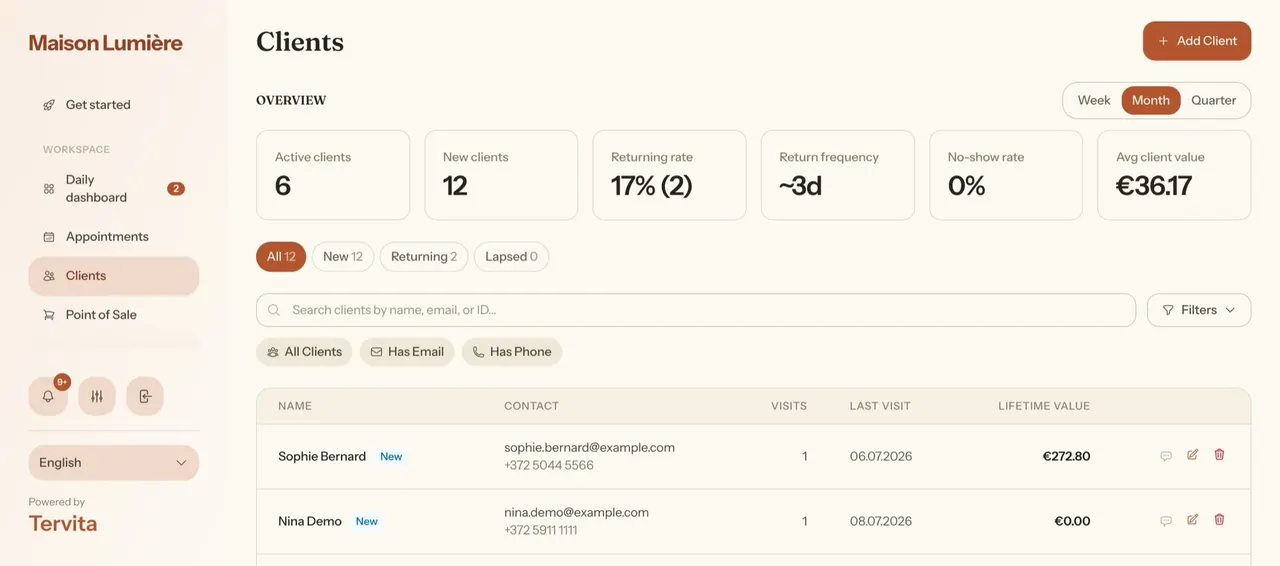
In Tervita, staff can create a client manually. In the current public-booking flow, an SMS-verified normalised phone is checked first when phone verification is used; without that verified match, an exact email can provide the fast match. If neither route establishes an existing record, the flow creates a new one. The product workflow is documented in Client records, marketing consent and GDPR. This is conditional exact matching, not fuzzy duplicate detection, so staff still need to check ambiguous people and shared family contacts.
How do you prevent duplicate client cards?
Duplicate control starts at reception, not with a large cleanup at the end of the year. Agree on a search order: phone, email, then name with a second identifying detail. Normalise obvious formatting differences, but never assume two people are the same solely because they share a name, household email or phone number.
Run a short weekly review for records that have:
- the same phone or email with compatible names;
- nearly identical names and overlapping visit details;
- a blank contact beside a second, better-completed record;
- a newly created card immediately followed by another booking for the same person.
When a pair is uncertain, leave it for a named person to review. Do not erase one card until you understand which appointments, invoices, purchases or notes are connected to it. This guide does not promise a one-click automatic merge in Tervita. The safe operating rule is to choose one canonical record for future work, correct its contacts, and resolve old duplicates through a controlled process rather than improvising during a busy shift.
How should salon staff write useful client notes?
A good note is a concise handover. It records an observable request or completed interaction, includes enough context to act on, and still makes sense months later. Examples include “prefers appointments before 12:00”, “asked to be called rather than emailed about schedule changes”, or “called on 13 July; will book after returning from travel”.
Avoid opinions, jokes, copied chat threads and speculative conclusions about a person. Do not store diagnoses or other sensitive details “just in case”. If a service genuinely requires special-category information, the business needs a separate purpose, lawful-condition and access assessment; an open-ended notes box is not a substitute for that work.
Tervita provides an interaction timeline where authorised staff can add a general note or log a call, email or visit; the entry keeps its author and time. That makes it suitable for operational continuity. It does not make every detail appropriate to record. Use a simple house style: action first, neutral wording, no unnecessary personal story, and a correction when circumstances change.
Who should see and edit the client database?
“Everyone works here” is not a sufficient access rule. A receptionist may need contacts and appointments; a specialist may need the records connected to service delivery; an owner or office manager may handle exports and erasure requests. Give each person an individual account and the permissions their duties require, then remove access promptly when a role changes or someone leaves.
The European Data Protection Board's small-business guidance recommends need-to-know access and differentiated authorisation profiles. It also warns against shared accounts because they weaken control and traceability. Tervita supports team roles and permission-based views; configure them with the team and roles guide and review the result using real tasks, not job titles alone.
Add an operational review at least quarterly: list current users, confirm their role, check who can view, update, export or erase client information, and close obsolete access. Staff should also lock unattended devices and avoid moving client details into personal chats or private spreadsheets merely because it feels faster.
Build a retention follow-up that staff can actually run
Retention work starts with a useful question, not a mass message: which clients are plausibly due to return and do not already have a future booking? Review the New, Returning and Lapsed segments on a fixed day each week. Then check the individual record before contacting anyone.
For each candidate:
- verify the last completed visit and normal service interval;
- check for an upcoming, cancelled or recently moved appointment;
- read only the relevant interaction history;
- confirm the available contact channel and its permission or other applicable basis;
- send a contextual message or make a call through the approved process;
- record the outcome, including “do not follow up again” when requested.
This is deliberately a staff-reviewed queue. Tervita's client segments, visit information and notes help identify context, but this guide does not claim an automatic win-back sequence. It also does not treat an appointment reminder as permission for a promotion. The client reminders guide explains appointment notifications; marketing choices and suppressions are covered in the client-records guide linked above.
Measure the process with modest operational numbers: candidates reviewed, valid contacts, conversations completed, next appointments booked and opt-outs recorded. Do not call every non-response a failure or attribute every later booking to one message without evidence.
Is your client-management routine reliable?
Use this checklist during a weekly database review. Selections are not stored after you leave the page.
What can Tervita support today?
Tervita currently provides a searchable Clients area, manual client creation and the conditional public-booking match described above: verified normalised phone first in the SMS-verification path, otherwise exact email. The working list can show visit count, last visit and client value, with New, Returning and Lapsed segments. A client card can bring together profile details, appointments, invoices, purchases, packages and an interaction-note timeline, subject to the user's permissions. Marketing choices, suppressions, GDPR export and anonymisation have their own controls.
Those features create one operational workspace; they do not repair poor data-entry habits by themselves. This article does not assume automatic duplicate merging or automatic retention outreach. Begin with a small rule the whole team can follow: search first, update the existing record, write a useful handover, and review the return queue once a week. If online booking is not yet connected to that process, use the salon online-booking guide to align the public journey with the staff calendar.
Frequently asked questions
Should every employee be able to read all client notes?
No. Access should follow the work a person performs and the information they need for it. Configure separate accounts and permissions, review them regularly, and keep notes concise enough that unnecessary exposure is reduced even for authorised users.
Can I message every client in the Lapsed segment?
Not automatically. First exclude people with a future booking, check the reason and context for contact, verify the permitted channel, and respect suppressions or objections. A segment is an operational shortlist, not proof that every person may receive the same promotion.
How often should a salon clean its client database?
Prevent errors at every booking, review possible duplicates weekly, and audit users and permissions at least quarterly. A short recurring routine is safer than an annual cleanup because staff can still remember recent interactions and correct mistakes before they spread.
A massage practice can use this checklist to connect repeat appointments with an orderly client record. See the massage business workflow for a concrete example, and use the salon software overview when comparing the wider feature set.