Salon staff scheduling in Estonia
Short answer: fix a repeating week for every specialist, record every exception separately — holiday, sick day, training, blocked time — and let that schedule decide what a client sees as free online. For rest time, allow 11 consecutive hours of daily rest and either 36 or 48 consecutive hours of weekly rest depending on how working time is calculated. Under summarised working time, the employee must know when and on what terms the next schedule will be issued, but the law does not set one universal number of days' notice.
A salon rota does two jobs at once. It is an employment-law document, because people have a right to rest and to know their shifts in advance. It is also a sales instrument, because every hour you put in it is an hour a client can book without calling you. When those two jobs live in different places — the law on paper, the availability in somebody's head — you get the familiar set of problems: one person works six days two weeks running, the website sells an hour that does not exist, and the cover learns about the change on Sunday night.
Which rest rules actually constrain the rota?
Three rules decide which rotas are possible at all. They come from the Employment Contracts Act and are explained in the Labour Inspectorate's guide to working and rest time.
- Daily rest. An employee must get at least 11 consecutive hours of rest in every 24-hour period. In practice that rules out a late evening finish followed by an early morning start.
- Weekly rest. At least 48 consecutive hours under ordinary working-time accounting, or at least 36 consecutive hours under summarised accounting.
- Issuing the schedule. Under summarised accounting the employer must tell the employee when and on what terms the work schedule will be issued. The law does not set a universal number of days' notice; changes to a schedule already issued must be agreed with the employee.
One change is easy to miss. Following the Court of Justice ruling in case C-477/21, the Estonian Labour Inspectorate has since 1 January 2024 treated daily and weekly rest as separate entitlements that must be given consecutively. For a shift worker under summarised accounting that means 11 + 36 = 47 hours in a row, rather than 36 hours with the daily rest folded inside it. The monthly hours do not change; where the gap between shifts has to fall does.
These are floors, not recommendations. A real salon rota is usually more generous — but without the numbers you cannot tell when you are close to the edge.
How do you build a week that holds?
Start from each specialist's repeating week rather than from individual days. A stable rhythm is the only thing a client, a colleague and a system can all learn.
- Write out each person's ordinary week — which days, and from when to when. If the rhythm runs over a fortnight, write out both weeks.
- Separate the hours that are not client work. Cleaning, deliveries, training, content: if it happens during working hours, it is time a client must not be able to take.
- Decide who is bookable at all. A receptionist or a bookkeeper can exist in the system without owning a column in the calendar.
- Agree who edits the rota. One owner, one place. Two people editing the same week in a chat app is the most common root cause of a double booking.
- Set a notice deadline and keep it even when the change looks small.
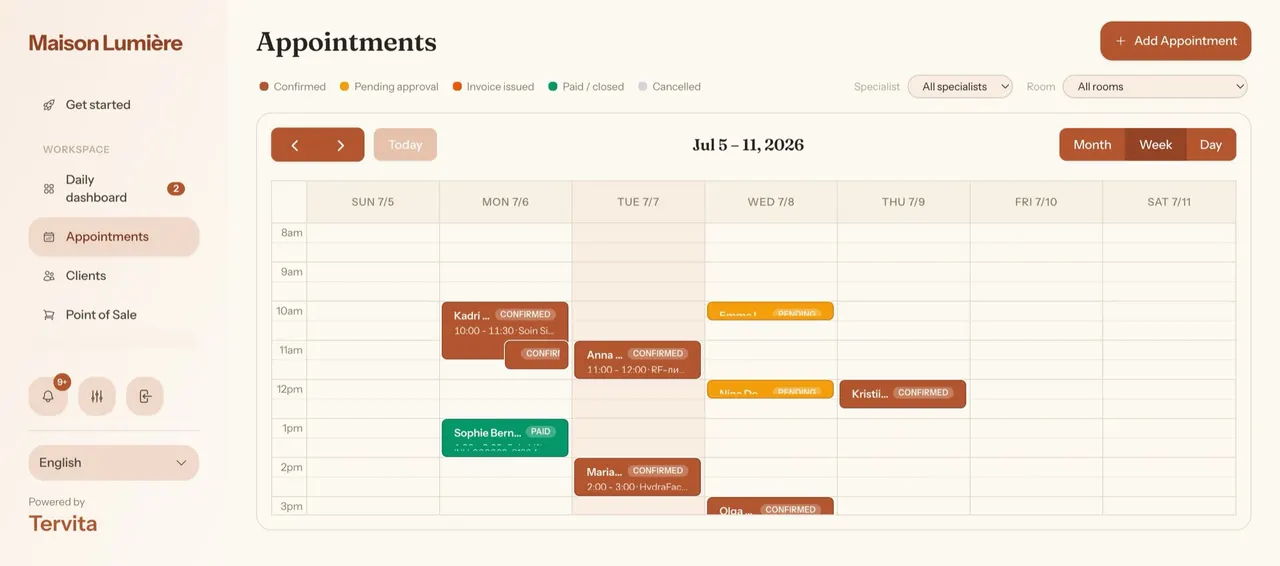
In Tervita all of this lives on the staff member's record. Each specialist gets weekly working hours, and exceptions are recorded separately: holiday, sick day, unpaid leave, training, blocked time or other. An approved exception drops out of the free slots and appears in the day view as a grey block, so a colleague can see immediately why nothing can be booked there. The basics are in the working hours guide, and the permissions side in the team and roles guide.
Why must the rota drive online booking too?
The rota has a second, quieter job: telling clients when they can come. When those two drift apart, the receptionist pays for it.
The drifts are always the same. A specialist agreed two days off but nobody recorded it, so the website sells the time. Training sits in the calendar as a reminder instead of blocked time, so the website sells the time. A new hire started but their week has not been entered, so the website offers none of their hours and the client concludes you are fully booked.
Hence one rule worth keeping: every exception goes where the schedule lives, and nowhere else. An approved exception in Tervita reaches the booking page immediately, because availability is computed from working hours, existing appointments and approved exceptions together. How far ahead and how late a client may book are separate controls in the booking settings.
Is next month's rota ready to publish?
Work through these before you tell the team. Ticks are not saved once the page is closed.
How should changes be handled?
No salon rota survives a month untouched. What matters is whether a change reaches all three parties: the employee, the calendar and the client.
For sickness the order is simple: record the exception, review the clients already booked into that day, and offer them a new time or another specialist yourself. Do not leave it for the client to discover. When an appointment has to move, dragging it to another column or another hour in the day view is faster and less error-prone than writing it down and re-entering it later.
When two colleagues swap shifts, the same rule applies as at the start: the change counts once it is in the rota. Tervita has no separate shift-swap request that an employee submits — whoever has permission to edit the schedule makes the change. That is a deliberate simplification rather than a hidden feature, and it is worth saying out loud to the team instead of promising a workflow the software does not have.
One more thing the software does not do: Tervita does not check employment-law compliance. It will not warn you that two shifts leave a nine-hour gap, and it does not calculate overtime for payroll. Rest periods and the accounting period remain the employer's responsibility; the system's job is to keep the decision visible and in one place. If you are unsure whether a pattern is allowed, the Labour Inspectorate's advisory service is the right address, not a settings page.
What to do in the first two weeks
If the rota has been living on paper or in someone's memory, there is no need to change everything at once.
- Week 1. Enter every specialist's repeating week and next month's known holidays. Compare the booking page against reality on one ordinary day.
- Week 2. Add non-client hours as blocked time and agree who makes changes. As an internal rule, aim to publish next month's rota, for example, five days before the month begins and see how many questions come back.
If, after a fortnight, "is she in tomorrow?" has moved from the group chat into the calendar, the rota is doing its job. The same logic is worth applying to reducing no-shows: an hour left empty costs a salon exactly as much as an hour planned wrong.
If you schedule practitioners across treatment rooms, use the physiotherapy practice checklist to test the connection between staff hours and bookable appointments. Compare the cost for your bookable specialists separately from the number of administrative users.